You've spent more time clips than editing them.
Your footage is scattered across drives, folders, and Apple Photos. VidFinder pulls every clip into one visual library made for video – organize every shot, find clips in seconds, no hunting, no uploading, no duplicate files.
For MacOS. Sign up from anywhere. No credit card required.
 “…the scrub search finds what I need – I haven't even bothered to tag anything” @kianiadamson
Built by an editor who ran out of patience with Finder.
If you edit video on a Mac, this was made for you.
Works alongside your existing folders. Nothing moves.
Finder is great...
For documents.
For video content, it's an organizational nightmare.
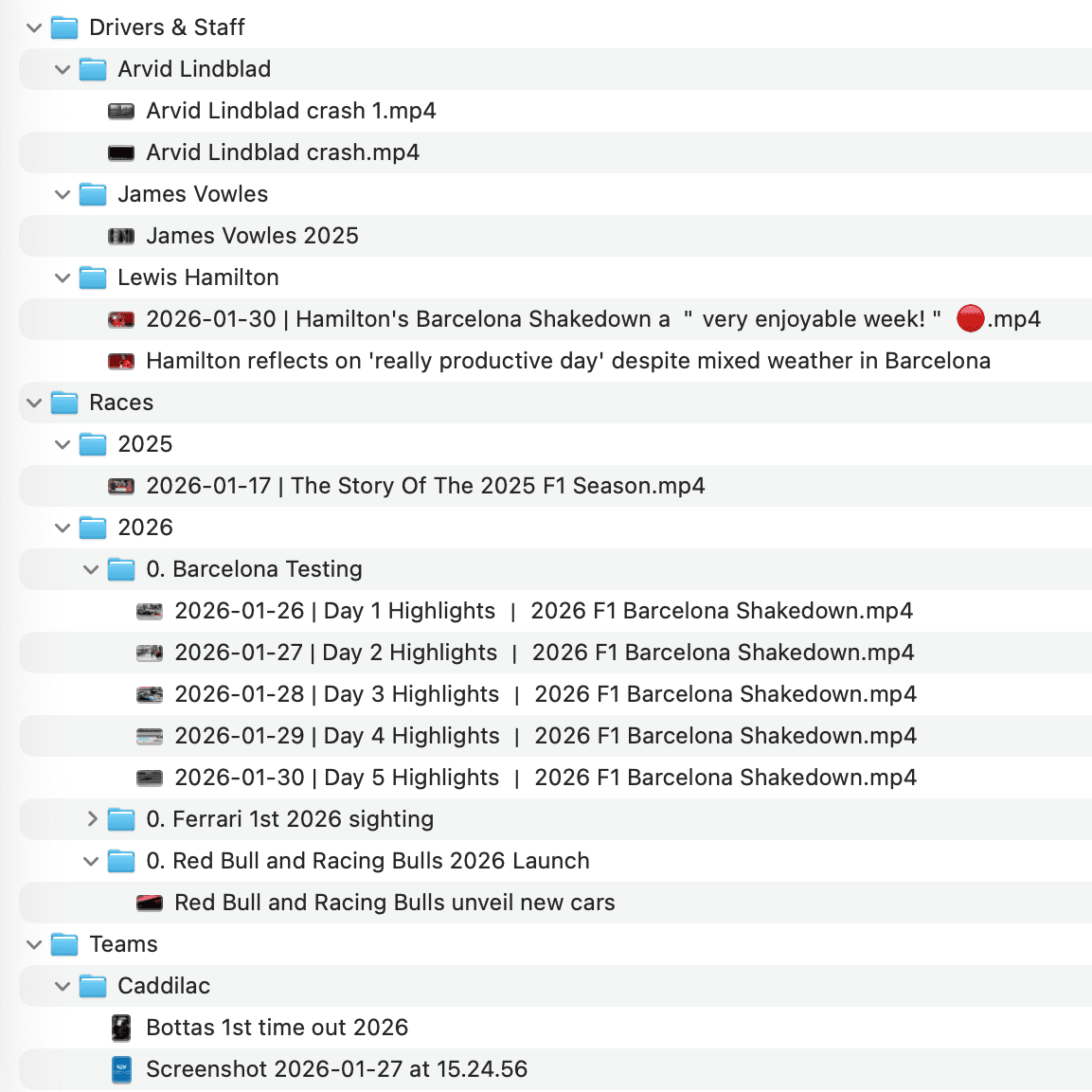
Finding a clip is folder roulette.
You shot the same moment from three angles. Which folder does it go in? You pick one – and the next time you need it...good luck finding it again.
Checking a clip takes forever.
In Finder, you get a filename. To see the clip, you have to open it, wait for it to load, scrub through a tiny timeline, close it... and do the whole thing again and again.
Exporting them is another story
There's no "select everything I found across 6 folders and drag them over together." You spend 20 minutes tracking down the clips you need. Then, another 10 minutes moving files into your editing software.
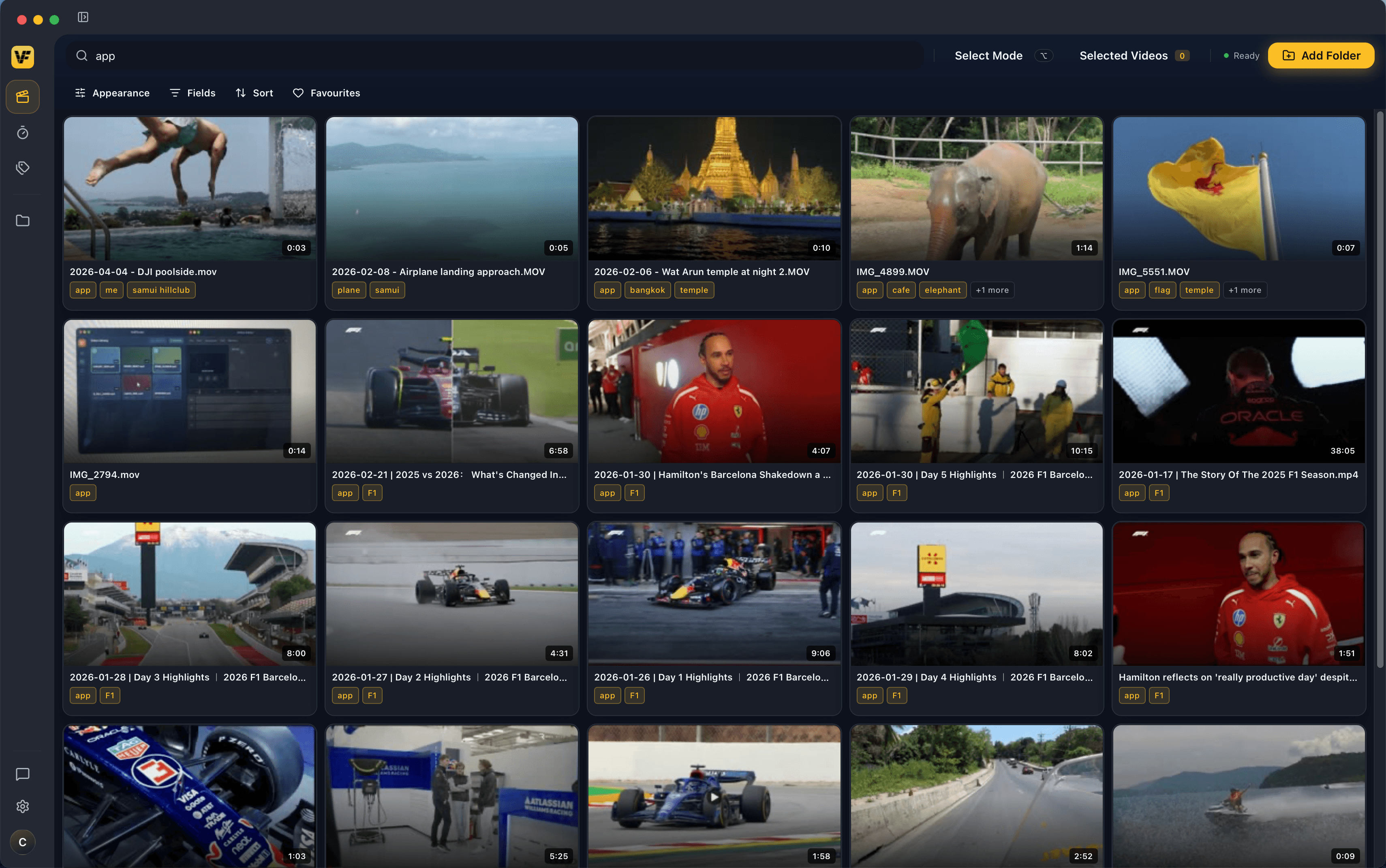
If you can see it in Finder, you can connect it to VidFinder
Turn every video on your hard drives, iCloud, Google Drive, and local folders into one searchable, scrubbable library.


Who is VidFinder for?
If you edit videos on a Mac, your workflow just got a whole lot easier
Video Editors
Client projects sprawled across every drive
Videographers
Thousands of clips from every shoot
Travel Creators
A trip's worth of footage to wrangle
Lifestyle Creators
Fresh content and B-roll, every day
Here's What VidFinder Will And Won't Do To Your Setup.

“When I make my tour-guide videos I have to go back through all my footage and find every Ang Thong clip. The scrub search has been so good at finding what I need that I haven't even bothered to tag anything.”
Here's how it works.
Everything you need.
Nothing you don't.
Finding your footage has never been easier.
Smart Search understands what your clips look like, not just what they're named – so one search across your tags, file names, folders, and visuals finds the right clip every time.
Scrub through any video without opening it.
Hover over any clip in VidFinder and scroll. The thumbnail scrubs through the footage in real time – no download, no loading screen, no opening your editing software just to check one frame. Which, somehow, no tools have figured out how to do properly – until now.




Straight from VidFinder to your video editor.
Once you've found what you need, quick select adds them all to your holding tray. Drag the whole batch wherever they need to go – Premiere, DaVinci Resolve, Final Cut, CapCut…even email or Slack. No individual exports. No copying files from different folders. No trip back for ones you missed. One drag. Done.
One clip. Every category it belongs in.
VidFinder auto-detects when you have new videos to process and prompts you to add your custom tags – unlimited tags, completely custom categorization, add individually or to multiple videos in one go.
It exists because nothing else did.
After years of managing video libraries in Apple Finder, trying every foldering system, every naming convention, every workaround that should have worked but didn't, and searching high and low for the right tool, it became clear that it just didn't exist. Honestly, we were sick of having to guess where we saved a video – that's why we built VidFinder.
“Video deserves visual organization, which is impossible when you are looking at folders and file names.”
The VidFinder Team
Built by editors, for editors
Manual AI prompting & organizing
Automated, clean, simple.
Tags per clip
No folder decisions, ever.
Unlock full access. Try VidFinder free for 7 days.
No credit card required. All features included from day one.
Your 7 days start when you download the app. No card needed.
Pricing
Simple, honest pricing.
Start free. Subscribe when you're ready.
Free Trial
All features included. No card required.
- Unlimited video libraries
- Unlimited custom tags
- Thumbnail scrub preview
- One-click bulk export
- macOS 13.0+ (Apple Silicon)
For MacOS. Sign up from anywhere. No credit card required.
Monthly
Full access. Cancel any time.
- Unlimited video libraries
- Unlimited custom tags
- Thumbnail scrub preview
- One-click bulk export
- macOS 13.0+ (Apple Silicon)
Annual
Save vs. monthly. Billed once a year.
- Unlimited video libraries
- Unlimited custom tags
- Thumbnail scrub preview
- One-click bulk export
- macOS 13.0+ (Apple Silicon)
“I can't believe this doesn't exist.”

Questions.
Organizing Your Videos Just Got 10X Easier
For MacOS. Sign up from anywhere. No credit card required.